使用 Appium 測試微信小程序 Webview

感謝
文章的主要思路來自于seveniruby的Appium 微信 webview 的自動化技術,非常感謝~~
打開調試功能
通過微信打開debugx5.qq.com 勾選【打開TBS內核Inspector調試功能】 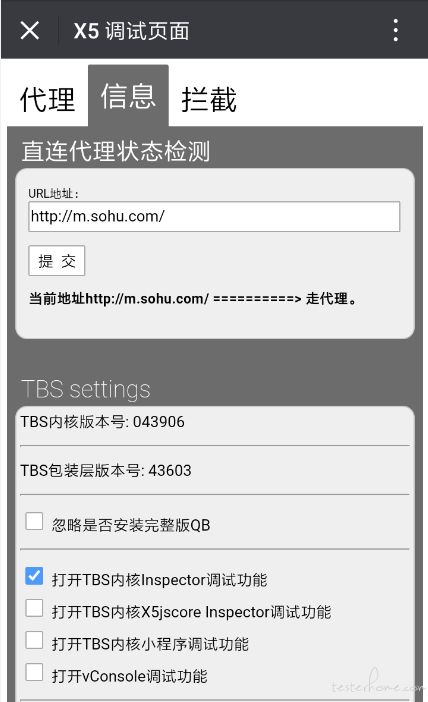
Chrome查看頁面元素
手機連接電腦,查看是否連接成功。如下展示設備號則為連接成功 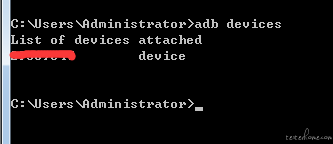 進入任意小程序,以【X東】為例,在Chrome瀏覽器訪問chrome://inspect/#devices
 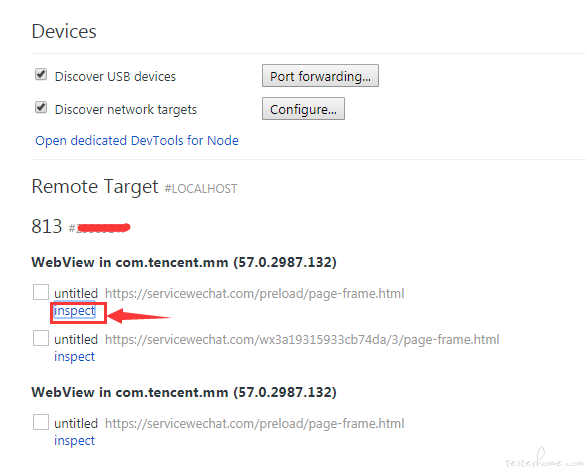 點擊inspact,即可查看頁面元素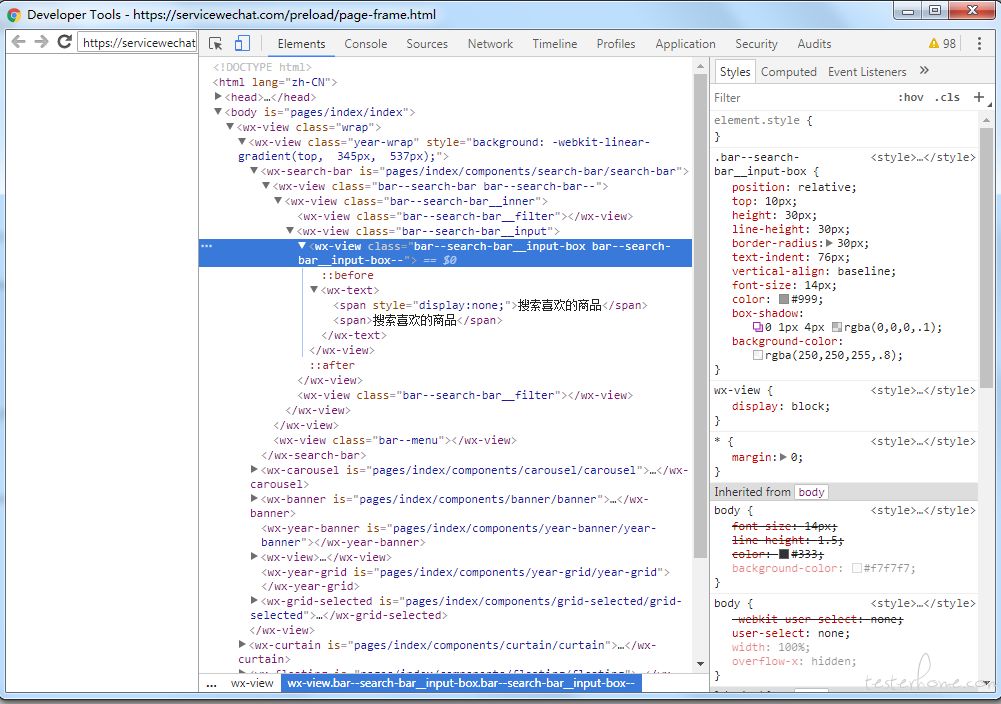
小程序的進程
微信有很多的進程,每一個小程序都運行在不同的進程中。 進入【X東】后,看下當前運行在哪個進程中 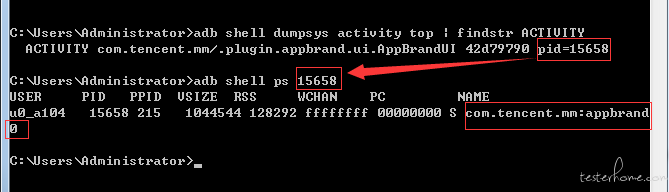 我們可以看到,當前的小程序運行在com.tencent.mm:appbrand0中,記住這個進程,記住啦
Appium編寫測試用例
最關鍵的一點,需要添加androidProcess這一項,也就是我們上面的com.tencent.mm:appbrand0 我用python寫一個簡單的demo
desired_caps = {
 ? ? ? ? ? ?'platformName': 'Android',
 ? ? ? ? ? ?'fastReset': 'false',
 ? ? ? ? ? ?'deviceName': 'XXXXXX',
 ? ? ? ? ? ?'appPackage': 'com.tencent.mm',
 ? ? ? ? ? ?'appActivity': '.ui.LauncherUI',
 ? ? ? ? ? ?'fullReset': 'false',
 ? ? ? ? ? ?'unicodeKeyboard': 'True',
 ? ? ? ? ? ?'resetKeyboard': 'True',
 ? ? ? ? ? ?'chromeOptions': {
 ? ? ? ? ? ? ? ?'androidProcess': 'com.tencent.mm:appbrand0'
 ? ? ? ? ? ? ? ?}
 ? ? ? ? ? ?}
driver = webdriver.Remote('http://localhost:4723/wd/hub', desired_caps)
driver.find_element_by_name("發現").click()
driver.find_element_by_name("小程序").click()
driver.find_element_by_name("X東購物").click()
driver.switch_to.context('WEBVIEW_com.tencent.mm:appbrand0')
time.sleep(5)
print(driver.page_source)
切換Webview失敗
我遇到過一種切換Webview失敗的情況,下面貼上appium的報錯日志。
> info: Chromedriver: Changed state to 'stopped' > error: Chromedriver: Chromedriver exited unexpectedly with code null, signal SIGTERM > warn: Chromedriver for context WEBVIEW_com.tencent.mm:appbrand1 stopped unexpectedly > warn: Chromedriver quit unexpectedly, but it wasn't the active context, ignoring > error: Chromedriver: Error: A new session could not be created. (Original error: session not created exception > from unknown error: Runtime.executionContextCreated has invalid 'context': {"auxData":{"frameId":"32496.2","isDefault":true},"id":2,"name":"","origin":"https://servicewechat.com"} > ? (Session info: chrome=57.0.2987.132) > ? (Driver info: chromedriver=2.18.343845 (73dd713ba7fbfb73cbb514e62641d8c96a94682a),platform=Windows NT 6.1 SP1 x86_64)) > ? ? at JWProxy.command$ (lib/proxy.js:133:15) > ? ? at tryCatch (D:Appiumnode_modulesappiumnode_modulesappium-chromedrivernode_modulesappium-jsonwp-proxynode_modulesbabel-runtimeregeneratorruntime.js:67:40) > ? ? at GeneratorFunctionPrototype.invoke [as _invoke] (D:Appiumnode_modulesappiumnode_modulesappium-chromedrivernode_modulesappium-jsonwp-proxynode_modulesbabel-runtimeregeneratorruntime.js:315:22) > ? ? at GeneratorFunctionPrototype.prototype.(anonymous function) [as next] (D:Appiumnode_modulesappiumnode_modulesappium-chromedrivernode_modulesappium-jsonwp-proxynode_modulesbabel-runtimeregeneratorruntime.js:100:21) > ? ? at GeneratorFunctionPrototype.invoke (D:Appiumnode_modulesappiumnode_modulesappium-chromedrivernode_modulesappium-jsonwp-proxynode_modulesbabel-runtimeregeneratorruntime.js:136:37) > ? ? at bound (domain.js:284:14) > ? ? at GeneratorFunctionPrototype.runBound (domain.js:297:12) > ? ? at run (D:Appiumnode_modulesappiumnode_modulesappium-chromedrivernode_modulesappium-jsonwp-proxynode_modulesbabel-runtimenode_modulescore-jslibrarymoduleses6.promise.js:89:39) > ? ? at D:Appiumnode_modulesappiumnode_modulesappium-chromedrivernode_modulesappium-jsonwp-proxynode_modulesbabel-runtimenode_modulescore-jslibrarymoduleses6.promise.js:100:28 > ? ? at flush (D:Appiumnode_modulesappiumnode_modulesappium-chromedrivernode_modulesappium-jsonwp-proxynode_modulesbabel-runtimenode_modulescore-jslibrarymodules$.microtask.js:17:13) > ? ? at process._tickDomainCallback (node.js:381:11) > ?{ [Error: A new session could not be created. (Original error: session not created exception > from unknown error: Runtime.executionContextCreated has invalid 'context': {"auxData":{"frameId":"32496.2","isDefault":true},"id":2,"name":"","origin":"https://servicewechat.com"} > ? (Session info: chrome=57.0.2987.132) > ? (Driver info: chromedriver=2.18.343845 (73dd713ba7fbfb73cbb514e62641d8c96a94682a),platform=Windows NT 6.1 SP1 x86_64))] > ? status: 33, > ? value: { message: 'session not created exceptionnfrom unknown error: Runtime.executionContextCreated has invalid 'context': {"auxData": 注意最后那一段的chrome和chromedriver的版本  查看對應表可知,兩者版本不對應,需要替換chromedriver
 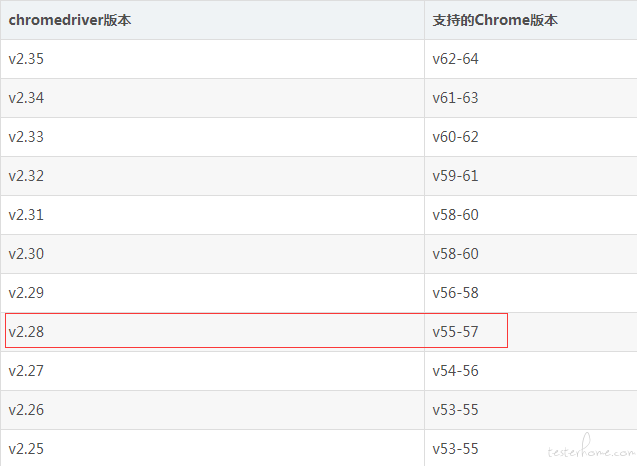 將Appium的chromedriver替換為相應版本后,即可成功切換。
以上就是關于【使用 Appium 測試微信小程序 Webview】的解答,如需了解學校/賽事/課程動態,可至翰林教育官網獲取更多信息。
往期文章閱讀推薦:
【組隊招募】經濟/數模競賽CNEC/IEO/SIC/HiMCM…組隊報名!


翰林AMC8視頻課重磅上線!

國際競賽真題資源免費領取